QR Code Menu Setup Guide: Free Bilingual Menu for Your Restaurant
QR code menus went from novelty to necessity in a remarkably short time. What started as a pandemic-era hygiene measure has become the standard for modern restaurants worldwide, and Dubai has adopted the technology faster than almost any other market. If your restaurant does not yet have a QR code menu, you are spending unnecessary money on printing, missing out on valuable customer data, and appearing less modern than your competitors. This guide walks you through setting up a free bilingual QR code menu from start to finish.
Why QR Code Menus Are the Standard in Dubai
Dubai's dining population expects digital convenience. Residents routinely use apps for everything from grocery delivery to government services, and scanning a QR code at a restaurant table feels natural. For tourists, who contribute billions of dirhams to Dubai's restaurant industry annually, a QR code menu with photos transcends language barriers entirely.
The practical benefits for restaurant owners are substantial:
- Eliminate printing costs: AED 3,000-10,000 per year in savings for a typical restaurant
- Update instantly: Price changes, new dishes, sold-out items, and seasonal specials go live in seconds
- Bilingual by default: Serve English and Arabic speakers with a single menu
- Include unlimited photos: Every dish can have a professional photo without the bulk and cost of a printed photo menu
- Collect data: Know which items customers view most, which they skip, and how long they spend browsing
Step 1: Choose Your Platform
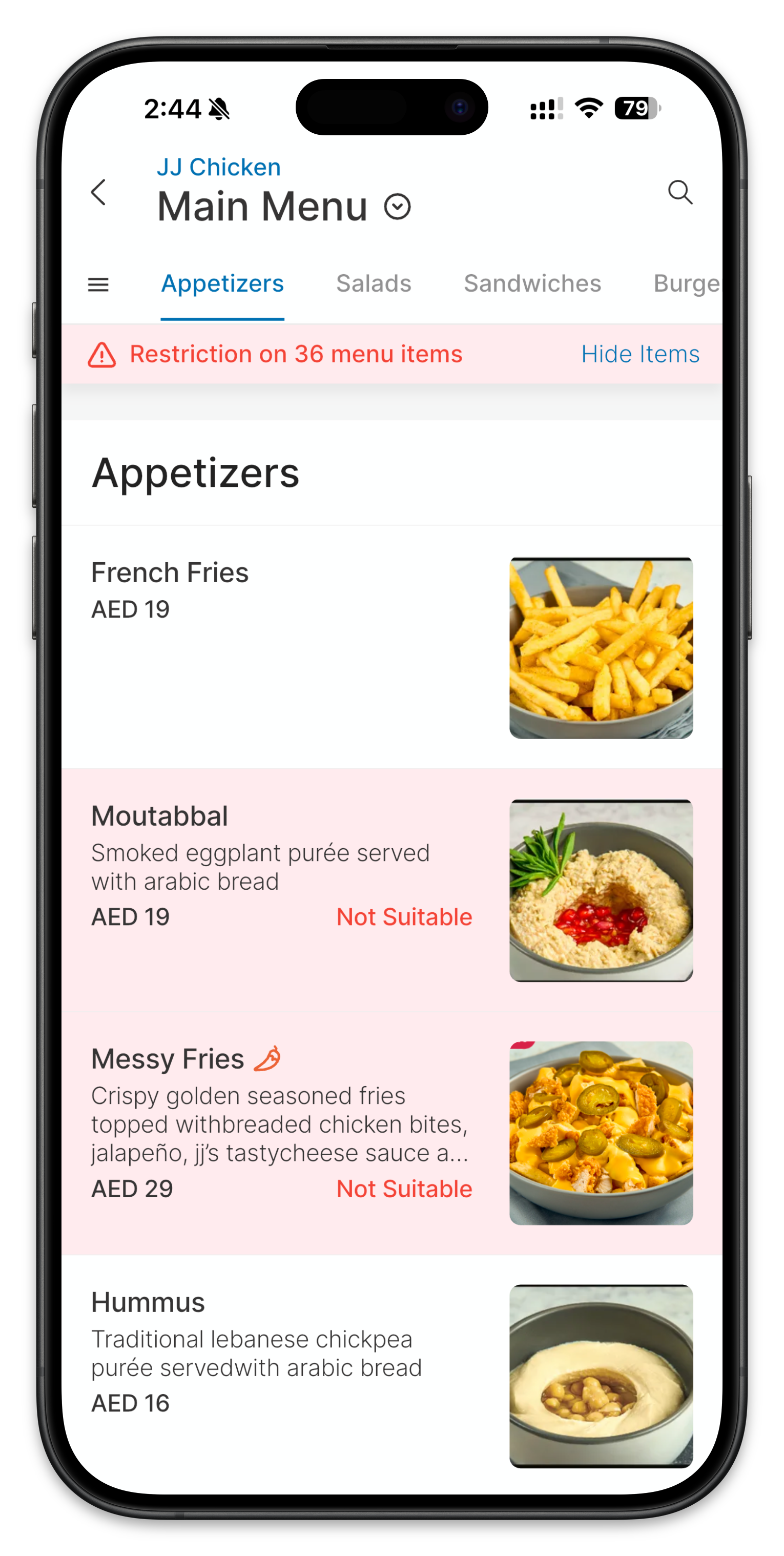
Several platforms offer QR code menu creation, but they vary significantly in features, cost, and ease of use. For Dubai restaurants, Places UAE's digital menu tool stands out because it is completely free, supports bilingual menus in English and Arabic, includes dietary and allergen labelling, and integrates with the Places cashback ecosystem that drives additional customer traffic to your restaurant.
When evaluating platforms, prioritise these features:
- No monthly fees: A QR code menu should not be an ongoing expense. Avoid platforms that charge monthly subscriptions.
- Bilingual support: Essential for Dubai. Your menu must display clearly in both English and Arabic.
- Photo support: The ability to add photos to every menu item is critical. A text-only digital menu is only marginally better than a paper one.
- Mobile-first design: The menu will be viewed on smartphones. It must load quickly, display beautifully on small screens, and be easy to navigate with one thumb.
- Real-time editing: You need to be able to update prices, mark items as unavailable, and add specials without any technical knowledge.
Step 2: Prepare Your Menu Content
Before you start building your digital menu, gather all the information you need:
For Each Menu Item
- Name in English and Arabic
- Description in English and Arabic (one to two sentences that highlight key ingredients and preparation method)
- Price in AED
- Photo (ideally taken in consistent lighting with a clean background)
- Dietary labels: vegetarian, vegan, gluten-free, nut-free, dairy-free, halal, spicy level
- Category: starters, mains, desserts, beverages, etc.
Photography Tips
You do not need a professional photographer. Follow these guidelines for consistent, appetising photos:
- Use natural light from a window. Avoid overhead fluorescent lighting.
- Shoot from a 45-degree angle for most dishes. Flat items like pizza look best from directly above.
- Use a plain white or dark background. A clean cutting board or simple plate works well.
- Include garnishes and sides as they would be served to a customer.
- Clean the plate edges before photographing. A smudge of sauce on the rim looks sloppy in a photo.
Step 3: Build Your Digital Menu
Using Places UAE's menu builder, the setup process is straightforward:
- Create your restaurant profile with your name, logo, location, and operating hours
- Add menu categories in the order you want them displayed (most restaurants start with popular items or specials, then starters, mains, desserts, and beverages)
- Add items to each category with names, descriptions, prices, and photos in both English and Arabic
- Tag dietary information for each item using the platform's built-in labels
- Preview the menu on a mobile device to ensure everything displays correctly
- Generate your unique QR code
The entire process takes between 30 minutes and two hours depending on the size of your menu and whether your photos are already prepared.
Step 4: Print and Place Your QR Codes
Your QR code needs to be visible, scannable, and durable. Here is how to get it right:
Size and Placement
Print the QR code at a minimum of 4cm x 4cm. Smaller codes can be difficult to scan in low-light restaurant conditions. Place codes on every table, either as a tent card, a sticker on the table surface, or embedded in a table number stand. Also place a larger QR code near your entrance for customers who want to browse before sitting down.
Printing Options
- Laminated cards: Print on card stock and laminate for durability. Cost: approximately AED 1-2 per card.
- Acrylic table stands: More premium look, easy to clean. Cost: AED 5-15 per stand from local suppliers.
- Stickers: The most economical option. Apply directly to tables or menus. Cost: under AED 0.50 per sticker.
Step 5: Train Your Staff
Your team needs to guide customers naturally. Not every customer will instinctively know to scan the code. Train your staff with a simple script: "Our menu is on the QR code here on the table. Just scan it with your phone camera and the full menu with photos will open up. If you prefer a paper menu, I am happy to bring one."
This approach defaults to digital while accommodating customers who prefer paper. Over time, the percentage requesting paper will decrease as customers become accustomed to the process.
Step 6: Maintain and Optimise
A digital menu is only as good as its accuracy. Establish a routine for keeping it current:
- Daily: Mark sold-out items as unavailable
- Weekly: Check that all prices are current
- Monthly: Add new dishes, remove discontinued items, and update photos for seasonal changes
- Quarterly: Review the menu data to understand which items are viewed most versus ordered most, and adjust descriptions or positioning accordingly
Pairing your QR code menu with a cashback programme creates a complete digital dining experience. Customers scan the QR code, browse your menu with photos and prices, enjoy their meal, and earn cashback through Places UAE that incentivises them to return. It is a modern, cost-effective, and customer-friendly approach that every Dubai restaurant should adopt.
Get Your Free Digital Menu on Places UAE
Join the Places cashback network and your digital menu is included. No subscription.
Get Your Free Digital Menu