How to Use Places UAE App: Step-by-Step Guide
Whether you have just downloaded Places UAE or you have had it on your phone for a while but never fully explored its features, this guide will walk you through everything you need to know. From first-time setup to advanced search techniques, here is how to get the most out of the app that is changing the way Dubai dines.
Getting Started: Download and Setup
Step 1: Download the App
Places UAE is available for free on both the Apple App Store and Google Play Store. Search for "Places UAE" and look for the official app. The download is small and installation takes less than a minute on most devices.
Step 2: Create Your Account
Open the app and tap "Sign Up." You can register with your email address, phone number, or sign in with your Apple or Google account for one-tap setup. No credit card is required to create an account. The app is completely free to use.
Step 3: Set Your Preferences
During setup, the app will ask you a few optional questions about your dining preferences. These help personalise your experience from the start:
- Favourite cuisines (you can select multiple)
- Dietary requirements (halal, vegan, gluten-free, allergies, etc.)
- Preferred areas of Dubai
- Budget preferences
You can skip this step and adjust your preferences later in Settings, but filling them in upfront means better recommendations from day one.
Step 4: Enable Location Services
For the best experience, allow the app to access your location. This enables "near me" searches, walking distance estimates, and location-based cashback notifications. You can choose "While Using the App" for privacy-conscious usage.
Exploring the Home Screen
The home screen is your starting point for restaurant discovery. Here is what you will find:
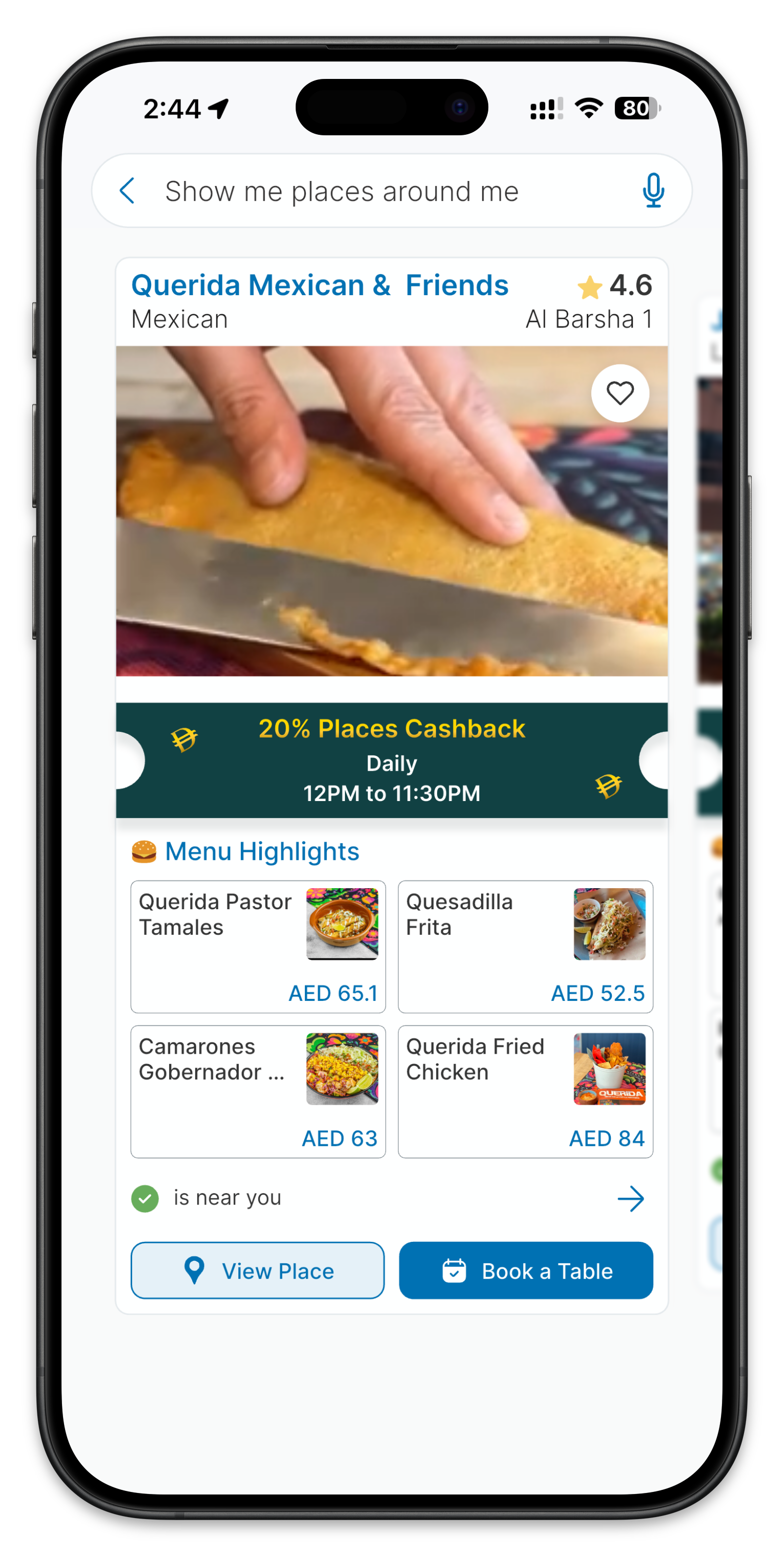
- Search Bar: The large search bar at the top accepts natural language queries. Type anything from "sushi" to "romantic dinner for two under 300 dirhams near the Marina."
- Featured Cashback Deals: Swipeable cards showing restaurants with the best current cashback offers. These change regularly, so check back often.
- Categories: Quick-access buttons for popular categories like Cuisine, Area, Dietary needs, and Budget range.
- Recommended for You: Personalised restaurant suggestions based on your preferences and dining history.
- Recently Viewed: Quick access to restaurants you have looked at recently.
Searching for Restaurants
Using Search
The search bar is the fastest way to find exactly what you want. Unlike traditional search, you can type in natural language:
- "Best biryani in Deira under 40 dirhams"
- "Quiet cafe with good wifi near Business Bay"
- "Where can I eat outdoors tonight in Downtown Dubai?"
The AI understands context, so you do not need to use specific keywords or filters. Just describe what you want as you would to a friend.
Using Filters
If you prefer a more structured approach, tap the filter icon next to the search bar. You can filter by:
- Cuisine type (50+ options)
- Location or neighbourhood
- Price range
- Dietary requirements
- Cashback percentage
- Open now
- Rating threshold
- Features (outdoor seating, parking, delivery, etc.)
Browsing by Area
Tap on the Area category to explore restaurants by neighbourhood. This is particularly useful when you are already in a specific area and want to see everything available nearby. Areas include Dubai Marina, Downtown Dubai, JBR, DIFC, Business Bay, Deira, and many more.
Viewing a Restaurant Profile
When you tap on a restaurant, you will see its full profile page. Here is what each section contains:
Overview
Restaurant name, cuisine type, price range indicator, rating, cashback percentage, and operating hours. A photo gallery shows the restaurant interior, exterior, and popular dishes.
Menu
A digital menu with item names, descriptions, prices, and photos where available. Many menus include allergen indicators and dietary labels. You ca search within the menu to find specific dishes quickly.
Reviews
Genuine user reviews with ratings, photos, and detailed feedback. You can filter reviews by rating, recency, or specific aspects like food quality, service, and ambiance.
Cashback Details
Clear information about the current cashback offer, including the percentage, any terms and conditions, and whether there are boosted rates at certain times.
Location and Directions
An integrated map showing the restaurant location with options to get directions via your preferred navigation app. Walking time from your current location is shown if you are nearby.
Earning and Using Cashback
How to Earn Cashback
- Find a restaurant with a cashback offer (indicated by a percentage badge on the listing)
- Dine at the restaurant
- Open the app after your meal and scan the QR code or upload your receipt
- Your cashback is calculated and credited to your Places wallet
Checking Your Balance
Tap the wallet icon in the bottom navigation to see your current cashback balance, pending rewards, and transaction history. You can see exactly how much you earned at each restaurant.
Using Your Cashback
Accumulated cashback can be applied to future dining bills at any partner restaurant. It stays in your Places Wallet — spendable there, not withdrawable to a bank account. There is no expiry on earned cashback, other than forfeiture after two years of account inactivity.
Advanced Features
Dietary and Allergen Profiles
In Settings, you can set permanent dietary and allergen profiles. Once configured, every restaurant and menu you view will automatically highlight safe options and flag potential allergen concerns. This is invaluable for anyone with food allergies or specific dietary requirements.
Favourites and Collections
Save restaurants to your Favourites for quick access later. You can also create custom collections like "Date Night Options," "Client Lunch Spots," or "Weekend Brunch." Share collections with friends to plan group outings.
Notifications
Enable push notifications to receive alerts about:
- New cashback offers at your favourite restaurants
- Limited-time boosted cashback events
- New restaurant openings in your preferred areas
- Personalised recommendations based on your activity
Tips for Power Users
- Use search for complex needs. The more detail you give, the better the results. Do not be afraid of long queries.
- Check the app before every meal. Even if you already know where you are going, check if the restaurant offers cashback on Places UAE. You might be leaving money on the table.
- Review restaurants after visiting. Your reviews help the community and improve the AI's recommendations for everyone.
- Keep your preferences updated. If you develop a new favourite cuisine or move to a different neighbourhood, update your profile so recommendations stay relevant.
- Explore the map view. Switching to map view when browsing can reveal excellent restaurants you might overlook in list view, especially when exploring a new area.
That covers the essentials. Places UAE is designed to be intuitive, but its depth of features means there is always something new to discover. Start with the basics, and as you use the app more, you will naturally find the features that matter most to your dining style.
Get Cashback at 190+ Dubai Restaurants
Pay your bill through the Places app and up to 50% comes back as cashback credit. No coupons, no vouchers. Free to download.